Maximum Security in SCP
In today's IT landscape, infrastructure security isn't just an optional feature—it's the bedrock of successful hosting. Anyone running a Root Server or VPS (Virtual Private Server) knows the drill: the moment an IP address becomes public, port scans and attack attempts begin. Until now, administrators primarily relied on local solutions like iptables, nftables, ufw, or Fail2Ban.
But Netcup has stepped up their game, releasing a feature many have been waiting for: A dedicated, upstream firewall that can be configured directly via the Server Control Panel (SCP).
The Paradigm Shift
Before diving into configuration, it's crucial to understand why this feature is so powerful. A classic firewall runs on the server itself. This means a malicious packet has to travel through the data center's network infrastructure before the software firewall can say, "You shall not pass."
It operates on Netcup's infrastructure level, stopping traffic before it ever touches your server. Unwanted data is filtered out before it can impact your system's load.
Feature Overview
Centralized Management
Configure everything directly within your browser via the SCP.
Policy-Based
Rules are grouped into "Policies" and can be assigned to multiple servers at once.
Default Policies
Pre-configured protection mechanisms for new servers.
Granular Rules
Filter by protocol (TCP, UDP, ICMP), source IPs, ports, and destination ports.
New vs. Existing Servers
- New Servers: Are provisioned fresh and come with Default Policies already active.
- Existing Servers: Netcup applies the principle of caution here. You must explicitly activate and configure the firewall.
Configuration in Detail
Let's look at how to set this up. Management is handled in the SCP under the "Network" tab.
1. The Policy Concept
Instead of tediously typing rules for every single server, Netcup uses Policies. A Policy is essentially a container for a collection of rules.
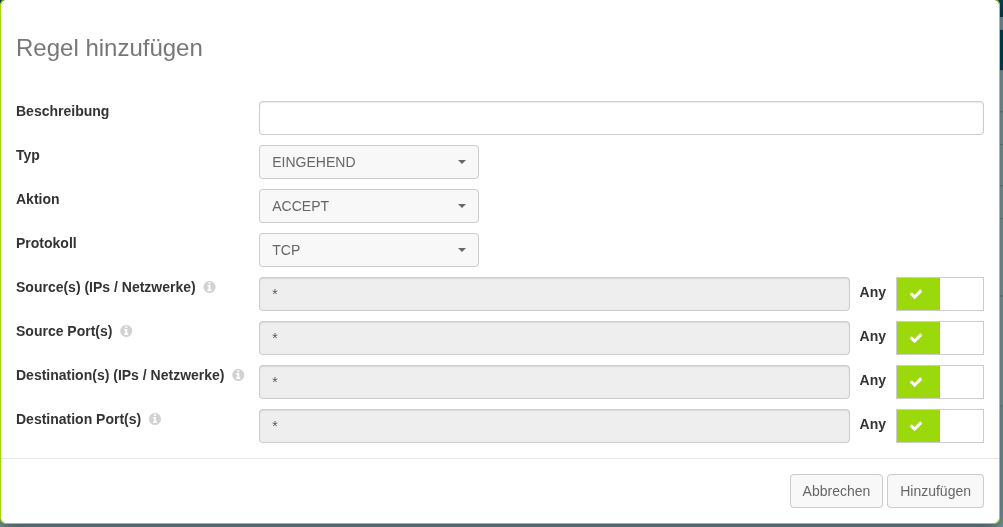
2. Defining Rules
The heart of the firewall is the individual rules. When you edit or create a policy, the dialog to add rules opens.

Firewalls process lists from top to bottom ("First Match").
3. Firewall Overview & Defaults
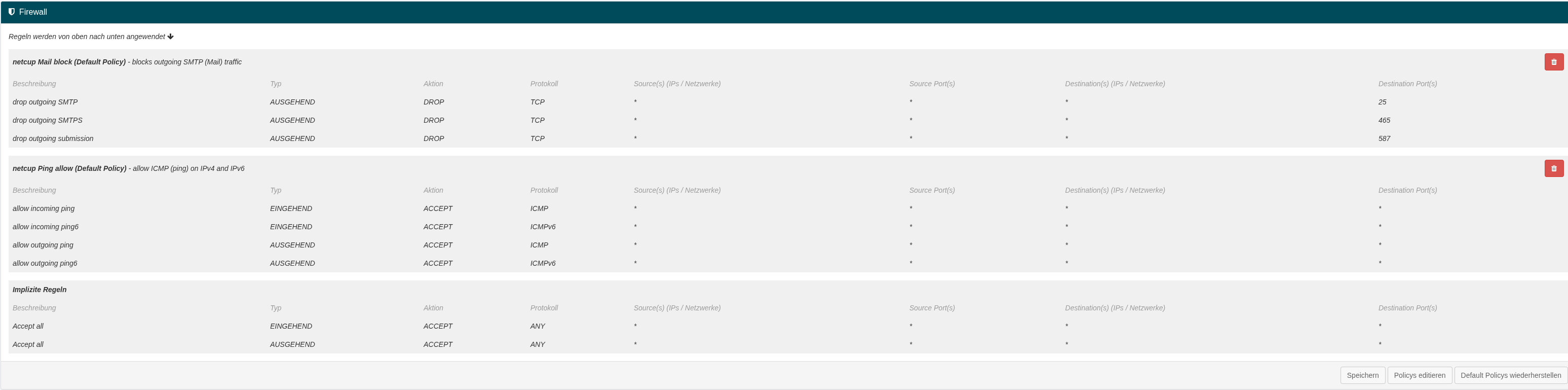
Two interesting standard entries provided by Netcup:
- netcup Mail block: Blocks outgoing SMTP to prevent spam.
- netcup Ping allow: Allows ICMP traffic for monitoring.
Strategies for Better Security
- SSH: Create a rule for Port 22 (TCP) for your IP only.
- Web: Allow Port 80/443 for Source:
*(Everyone).
- Web Access: Keep ports 80/443 closed.
- DB Access: Allow Port 3306 only for the IP of your web server.
Should you disable the local firewall? No! Always keep multiple layers of security.
Conclusion
The introduction of the SCP Firewall is a significant step. Take an hour next weekend, log into the SCP, and start building your policies.